
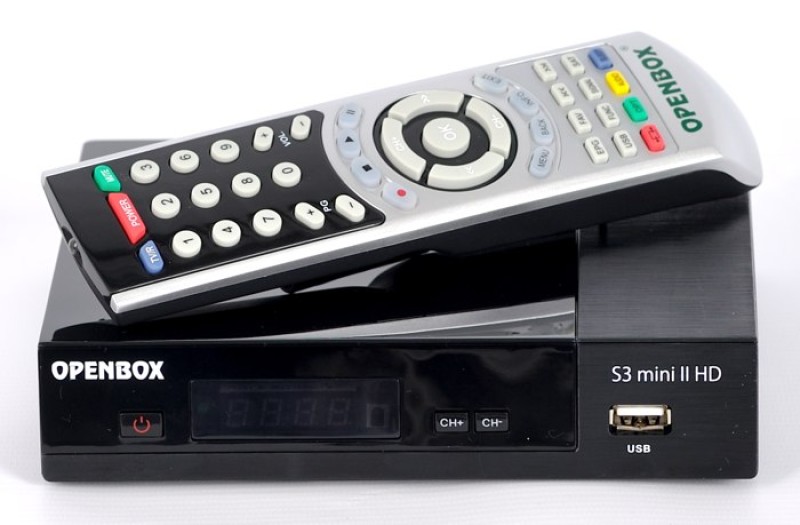
The Openbox S3 Mini on the Sunplus SP3601 chipset turns into a „brick” after a failed update or a power interruption during writing. The standard menu is unavailable. USB recovery does not work. The only workable path — is flashing via UART/RS-232 directly from the board, and it is exactly this sequence of actions that we will break down below without unnecessary digressions.
What does the „brick” state mean and why will USB not help here?
A „brick” — is a state when the bootloader is corrupted or the firmware was written only partially. The tuner does not enter the menu: the indicator either does not light at all or freezes on a static error code. The USB recovery mode on the S3 Mini is initiated by the bootloader itself, so if it is damaged — USB is useless from the start. RS-232 (UART) connects to the processor bypassing the bootloader and makes it possible to write the image from scratch.
What RS-232 cable is needed and where to find the contacts on the board?
A USB-to-UART adapter based on the CP2102, CH340 or PL2303 chip is needed. The signal levels on the S3 Mini board — are 3.3 V, so a direct RS-232 connection (±12 V) will burn the processor's UART pin. Use exclusively TTL adapters.
The UART contacts are located on the board next to the SP3601 processor in the form of an unsoldered 1×4 connector or three 1×3 pads. The pinout (from left to right with the standard board orientation):
| Pin | Purpose | Connection to the adapter |
|---|---|---|
| 1 | GND | GND of the adapter |
| 2 | TX (board) | RX of the adapter |
| 3 | RX (board) | TX of the adapter |
| 4 | VCC 3.3 V | do not connect |
Before soldering, check with a multimeter: between GND and the VCC pin there should be exactly 3.3 V with the tuner on. If the reading is different — look for the problem in the power supply, not in the UART.
How to prepare the computer and configure the COM port?
Install the adapter driver: the CP2102 requires the Silicon Labs package, the CH340 — WCH. After connecting, check the COM port number in Device Manager. The parameters of the terminal or the flashing utility:
- Speed: 115200 baud
- Data bits: 8
- Parity: None
- Stop bits: 1
- Flow control: None
On Windows 10/11 we checked the connection through Tera Term and PuTTY — both show the output of the bootloader lines right after power is applied. For the flashing itself, use the proprietary utility supplied together with the image from Openbox. On Linux minicom or screen /dev/ttyUSB0 115200 is enough.
The step-by-step flashing process via RS-232
- Disassemble the S3 Mini body (4 screws on the bottom + 2 under the sticker).
- Solder or press wires with tweezers to the UART pads.
- Connect the adapter to the computer's USB, do not turn on the tuner.
- Open the flashing utility, specify the COM port and the image file (64 MB, .abs or .bin format).
- Plug the tuner into the mains — the utility should detect the bootloader within 3-5 seconds.
- Start the writing. The progress bar moves slowly: 15 minutes on a CP2102 adapter, up to 45 minutes on cheap CH340 clones, which in practice give lower throughput even at the declared 115200 baud.
- After 100% do not cut the power for another 60 seconds — the tuner will restart by itself.
What to do with errors during flashing?
| Symptom | Cause | Solution |
|---|---|---|
| The utility does not see the device | Mixed-up TX/RX or poor contact | Swap TX and RX, check the soldering |
| Error at 30-40% | A power interruption or a bad USB cable of the adapter | Use a USB 2.0 port on the rear panel of the PC, stabilized power for the tuner |
| Flashing finished, the tuner does not start | An unsuitable firmware image | Download the image specifically for the S3 Mini from the official Openbox site |
| The adapter is detected, but there is no response | The speed is not 115200 or the wrong COM | Check the port settings in the utility |
How to check the result after the revival?
After the first boot the tuner will show the initial setup wizard. Go to Menu — System Information and match the firmware version with the one you uploaded. Connect the antenna cable and run an automatic channel search. In our case, on a bench with the S3 Mini, the tuner found the transponders on the very first pass and confidently decoded the signal — the revival can be considered complete.
FAQ
- Can the Openbox S3 Mini be recovered without a computer?
- No. With a damaged bootloader an external device with a COM port or a USB-UART adapter is needed. Without a computer recovery is impossible.
- What is the difference between UART and RS-232 for the S3 Mini?
- UART — is a protocol, RS-232 — a voltage-level standard (±12 V). The S3 Mini board uses UART at 3.3 V levels. Connecting real RS-232 without a level converter is not allowed.
- Where to find the original firmware for the Openbox S3 Mini?
- On the official site openbox.ua or openbox.com.ua in the support section. The image is 64 MB in size. Firmware from other Openbox models does not fit.
- How long does flashing via RS-232 take?
- From 15 to 45 minutes. CP2102 adapters are faster, cheap CH340 clones may give a lower real speed even at the declared 115200 baud.
- Will the flashing procedure void the warranty?
- Disassembling the body and soldering to the UART pads automatically void the warranty. If the tuner is still under warranty — contact a service center.
No comments yet. Be the first!