
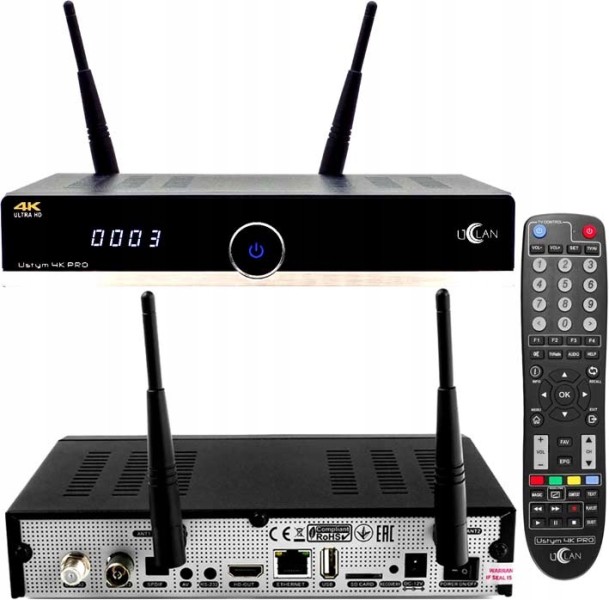
Flashing a tuner means replacing or updating its built-in firmware. This fixes bugs, adds support for new transponders, and brings your device back to life after failures. Depending on the model and connection method, the entire process takes 5 to 15 minutes.
What is tuner firmware and why update it?
Firmware is low-level software that controls everything: frequency scanning, signal decoding, and menu interface. Updates are necessary in three specific situations:
- the tuner stopped finding channels after transponder parameters changed;
- the manufacturer fixed a critical bug in a new firmware version;
- you need features not available in the factory version — for example, BISS keys or an IPTV player.
E2 and Enigma2 firmware for DreamBox is released approximately once a month. The DreamBox 7020HD uses a file around 200 MB in size, with the current version 2.0.8 released in 2023.
What equipment and software do you need for flashing?
The minimum setup depends on your chosen method:
| Method | What You Need | Difficulty |
|---|---|---|
| USB drive | FAT32 drive up to 32 GB, firmware file | Low |
| COM port | RS-232 cable or USB-to-COM adapter, FlashTool / DreamUp | Medium |
| Ethernet (FTP) | LAN cable, FTP client (FileZilla) | Medium |
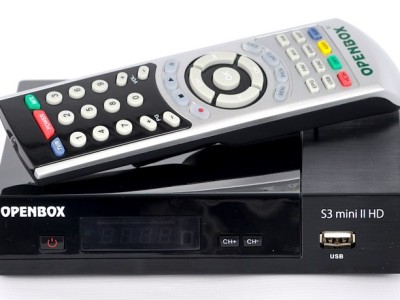
Openbox S3 Pro and Openbox X5 HDMI can be flashed via USB without additional cables or any third-party software on your computer — just a USB drive and a button.
How to flash a tuner via USB: step-by-step instructions?
- Download the firmware file from the manufacturer's official website or a trusted source.
- Verify the MD5/SHA256 hash of the file using HashCheck or CertUtil — it must match the one listed on the download page.
- Format the USB drive to FAT32, copy the file to the root directory.
- Power off the tuner and insert the USB drive.
- Turn on the device while holding the "Menu" or "OK" button depending on the model — the tuner will enter update mode.
- Confirm the file selection on screen and wait for completion. Do not power off during writing — this is the most common cause of a "bricked" device.
- After reboot, verify the firmware version in the "About Device" menu.
We tested this on Sat-Integral S-1248HD: the flashing takes 5-15 minutes depending on file size, with the front panel indicator blinking throughout.
How to flash a tuner via COM port and when is it needed?
The COM method is an emergency option when the tuner won't start at all and USB mode is unavailable. You're essentially writing directly to the bootloader, bypassing the device's operating system.
- Connect an RS-232 cable between your PC and the tuner, or use a USB-to-COM adapter.
- Launch FlashTool or DreamUp, select the COM port and set speed to 115200 bps.
- Specify the path to the firmware file.
- Power on the tuner — the program will automatically intercept the bootloader and begin writing.
- The process takes 10-20 minutes, after which the device reboots automatically.
What if the tuner won't turn on after flashing?
Why this happens and how to fix it — here are four main scenarios:
- Wrong firmware file — download the version that matches your exact hardware revision (HW revision is listed on the sticker at the bottom of the device).
- Power interrupted during writing — try recovery mode: hold the reset button while plugging in the power.
- Corrupted bootloader — you'll need the COM port for this; a full flash memory rewrite is required.
- Incompatible modified firmware — revert to the original version from your backup.
Back up your original firmware before making any changes using the "Backup firmware" menu or the manufacturer's utility. It takes two minutes but can save you an hour of recovery.
Where to find safe firmware and how to verify the file?
Checklist for verifying a file before flashing:
- Download only from the manufacturer's official website or major specialized forums — Sat-Universe, MyBroadband.
- Verify the MD5/SHA256 hash: it must match the one published by the manufacturer alongside the file.
- Scan the archive on VirusTotal before extracting.
- Don't use modified firmware from file-sharing sites without a verified source — you risk getting a compromised image with backdoors.
- Modified firmware sometimes improves reception on 10600-12750 MHz frequencies (Astra 4A, Eutelsat W4), but in our testing with Openbox S3 Pro we observed unstable operation after three days.
FAQ
- Do channels get lost after flashing a tuner?
- Yes, in most cases the channel list resets to factory settings. Save a backup of your channel database through the tuner menu or USB export before starting the flash.
- How long does tuner flashing take?
- Via USB — 5-15 minutes. Via COM port — 10-20 minutes. It depends on file size and connection speed.
- What's the difference between original and modified firmware?
- Original firmware is tested, has no extra features, and comes with official support. Modified firmware may include extended settings, BISS key support, or new transponders, but the manufacturer doesn't guarantee its operation.
- How do I know which firmware version is right for my model?
- The hardware revision (HW revision) is listed on the sticker at the bottom of the tuner or in the "About Device" menu. Always check it against the firmware file requirements before downloading.
- Can you flash a tuner without a PC?
- Yes, if your model supports USB updates — for example, Openbox S3 Pro, Openbox X5 HDMI. You just need a USB drive with the firmware file in the root directory.
No comments yet. Be the first!